

How To Create Cross Object Formula Field In Salesforce

Manually tracking Sales-based Leads and collecting data from Customer Interactions, Social Media, Emails, etc. can be a tedious task, especially if your customer base is growing exponentially. To overcome this hurdle, you can use automated CRM platforms like Salesforce.
Upon a complete walkthrough of this article, you will gain a decent understanding of Salesforce and the features that it offers. You will also learn about Cross Object Formula in Salesforce. Read along to learn more about Cross Object Formula Salesforce Field.
Table of Contents
- Prerequisites
- Introduction to Salesforce
- Key Features of Salesforce
- Introduction to Cross Object Formula Salesforce
- Key Features of Cross Object Formula Salesforce
- Steps to Create Cross Object Formula Salesforce Field
- Limitations of Cross Object Formula Salesforce Field
- Conclusion
Prerequisites
- An active Salesforce account.
Introduction to Salesforce

Salesforce is one of the most popular Cloud-based Customer Relationship Management (CRM) software for managing customer relationships and integrating with other systems. This SaaS tool helps create custom Marketing, Sales, Services, and E-Commerce solutions based on the business requirements and has now moved from just CRM to offering multiple products.
Key Features of Salesforce
Some of the key features of Salesforce are as follows:
- It is a complete, feature-rich solution for marketing, sales, service, partner management, and community management.
- Salesforce provides the users with interactive Dashboards that features real-time reports to capture Customer Behavior, Market Trends, Sales Records, and many more.
- Salesforce data is stored in the Cloud so your team can use it from anywhere in the world with an active internet connection.
- Salesforce provides an intuitive view of the customer timeline. It allows the businesses to analyze their Buying Pattern, Metrics, Purchasing History, and many more which can help in formulating business strategies.
- Campaigns can be continuously optimized based on the Market reaction and the subsequent interaction with channel partners.
For further information on Salesforce, click here to check out their official website.
Introduction to Cross Object Formula Salesforce
Cross Object Formula Salesforce are formulas that help users to display two related objects by referencing one another. For example, if an Invoice is related to another object, say contact, then by using Salesforce's Cross Object formula, users can reference fields from contacts such as email and create the Contact Email field in the Invoice record.
Key Features of Cross Object Formula Salesforce
Some of the key features of Cross Object Formula Salesforce are as follows:
- Cross Object Formula Salesforce can reference fields from Master(Parent) objects and allow users to create reference fields.
- Cross Object Formula Salesforce, also works for Lookup relationships.
- It allows up to 10 relationships to reference fields from each other.
Hevo Activate helps you directly transfer data from Snowflake, Amazon Redshift, etc., and various other sources to CRMs such as Salesforce, HubSpot, various SaaS applications, and a lot more, in a completely hassle-free & automated manner. Hevo Activate is fully managed and completely automates the process of not only loading data from your desired source but also enriching the data and transforming it into an analysis-ready form without having to write a single line of code. Its fault-tolerant architecture ensures that the data is handled in a secure, consistent manner with zero data loss.
Hevo Activate takes care of all your data preprocessing needs and lets you focus on key business activities, and draw a much powerful insight on how to generate more leads, retain customers, and take your business to new heights of profitability. It provides a consistent & reliable solution to manage data in real-time and always have analysis-ready data in your desired destination.
Get Started with Hevo for Free
Check out what makes Hevo Activate amazing:
- Real-time Data Transfer: Hevo Activate, with its strong Integration with various sources, allows you to transfer data quickly & efficiently. This ensures efficient utilization of bandwidth on both ends.
- Data Transformation: It provides a simple interface to perfect, modify, and enrich the data you want to transfer.
- Secure: Hevo Activate has a fault-tolerant architecture that ensures that the data is handled in a secure, consistent manner with zero data loss.
- Tremendous Connector Availability: Hevo Activate houses a large variety of connectors and lets you bring in data from numerous Data Warehouses and load it into Marketing & SaaS applications, such as Salesforce, HubSpot, Zendesk, Intercom, etc. in an integrated and analysis-ready form.
- Simplicity: Using Hevo Activate is easy and intuitive, ensuring that your data is exported in just a few clicks.
- Completely Managed Platform: Hevo Activate is fully managed. You need not invest time and effort to maintain or monitor the infrastructure involved in executing codes.
- Live Support: The Hevo Activate team is available round the clock to extend exceptional support to its customers through chat, email, and support calls.
Users can leverage Hevo Activate to perform the following operations:
- Create User Segments: Creating user segments allows the Marketing and Sales teams to understand how resources should be utilized for different kinds of users. This allows teams to focus on channels that convert better and maximize their Return On Investment (ROI).
- Build 360 View of Customers: This can be used to understand each customer better and plan strategies accordingly to ensure maximum revenue. This information can also be leveraged to help Support teams prioritize Enterprise customers. Businesses can seamlessly sync all customer data into their support software and respond quicker with a holistic customer background.
- Sync Product Data into Sales CRM: Hevo Activate can be leveraged to get all product data in the CRM tool of choice, allowing businesses to track user activity easily. Users can be segmented based on their activity, and that information can be used to improve product adoption and prevent churns.
Sign up here for a 14-Day Free Trial!
Steps to Create Cross Object Formula Salesforce Field
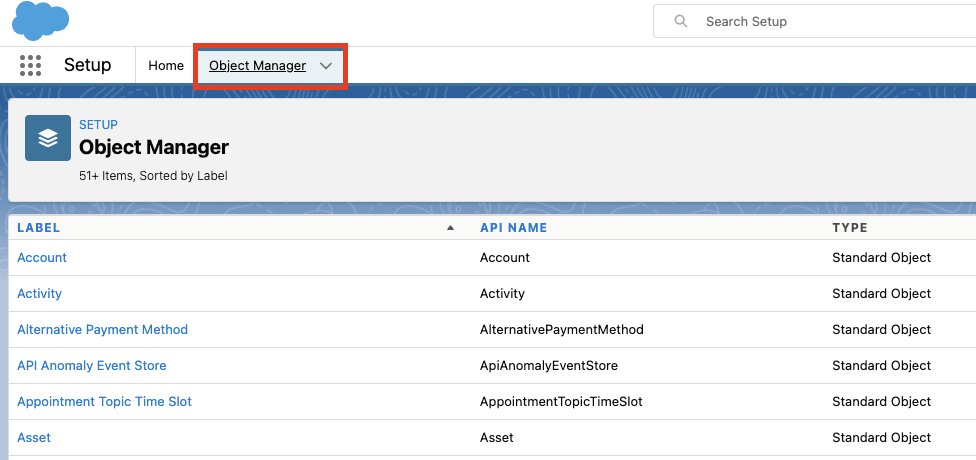
- Step 1: Login to your Salesforce account and select Object Manager.
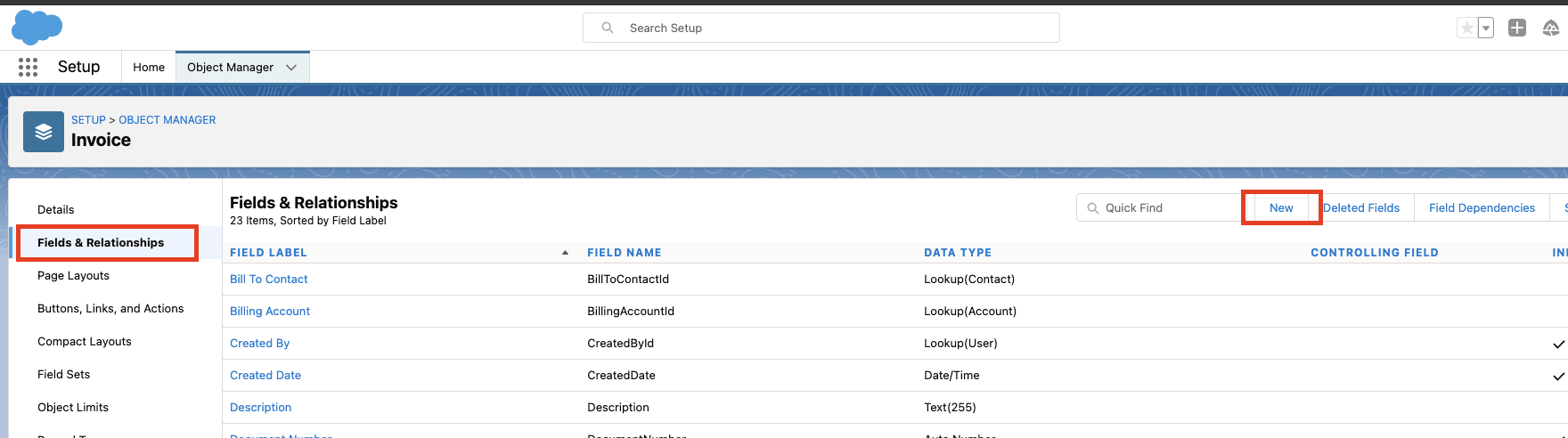
- Step 2: Select the Object to say – Invoice and then select Fields & Relationships and then click on New.
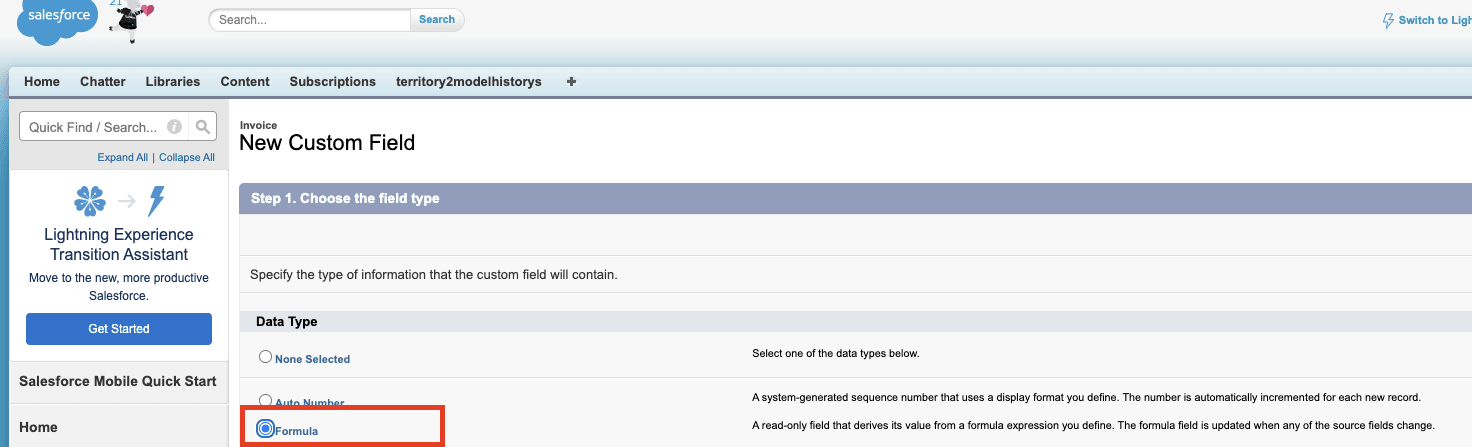
- Step 3: Select Formula, and then click on Next.
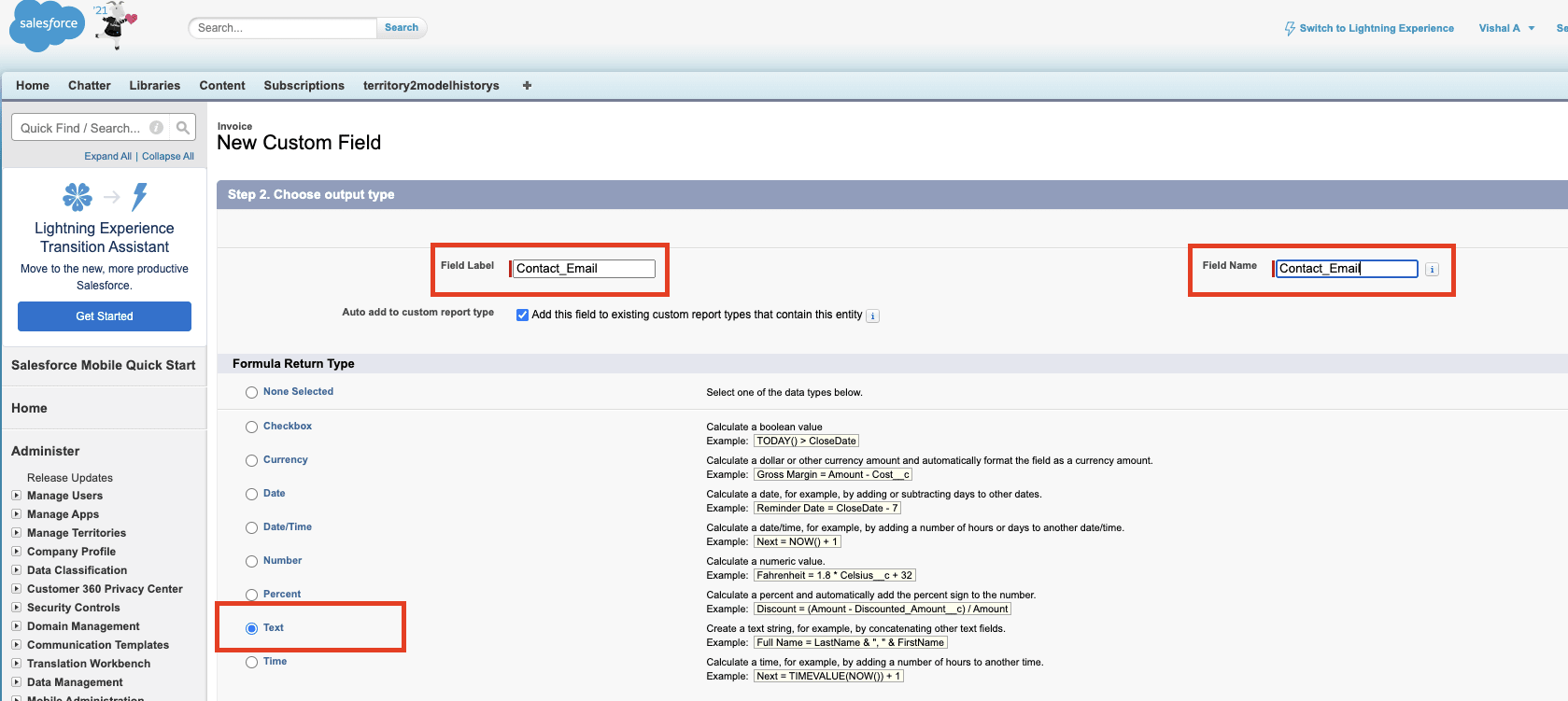
- Step 4: On the next page, Add Field Label and Field Name, and select the data type as required, and then click on Next.
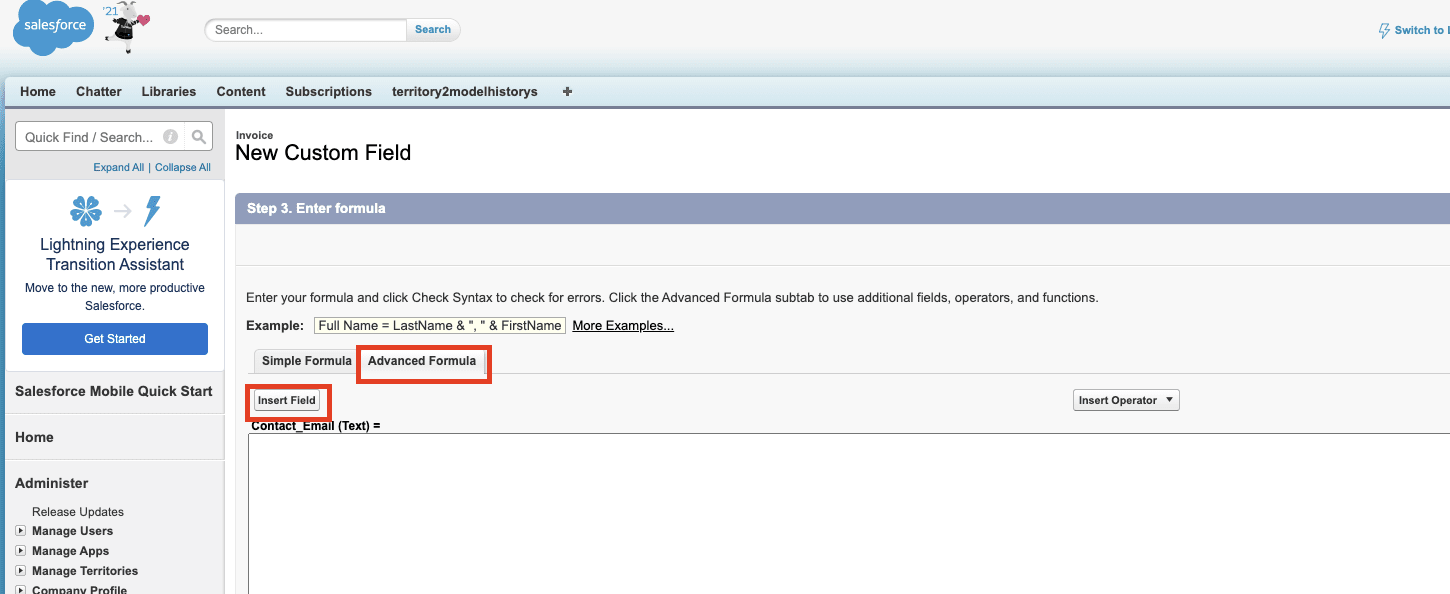
- Step 5: Click on the Advanced Formula, and then click on the Insert Field option.
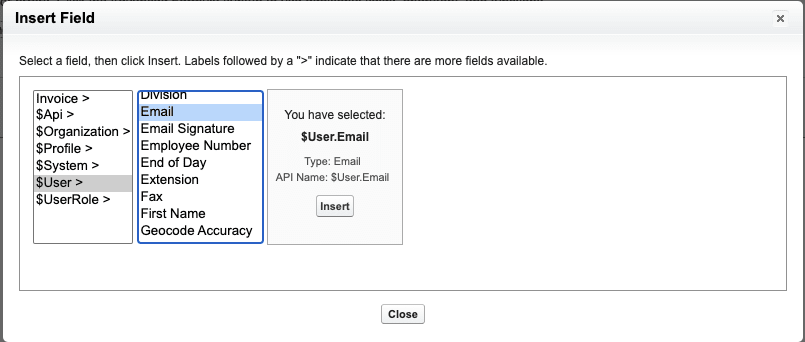
- Step 6: Once you clicked on Insert Field, a new pop up will appear which shows the related Objects. Navigate to Users and then select Email to link User's Email with Invoice.
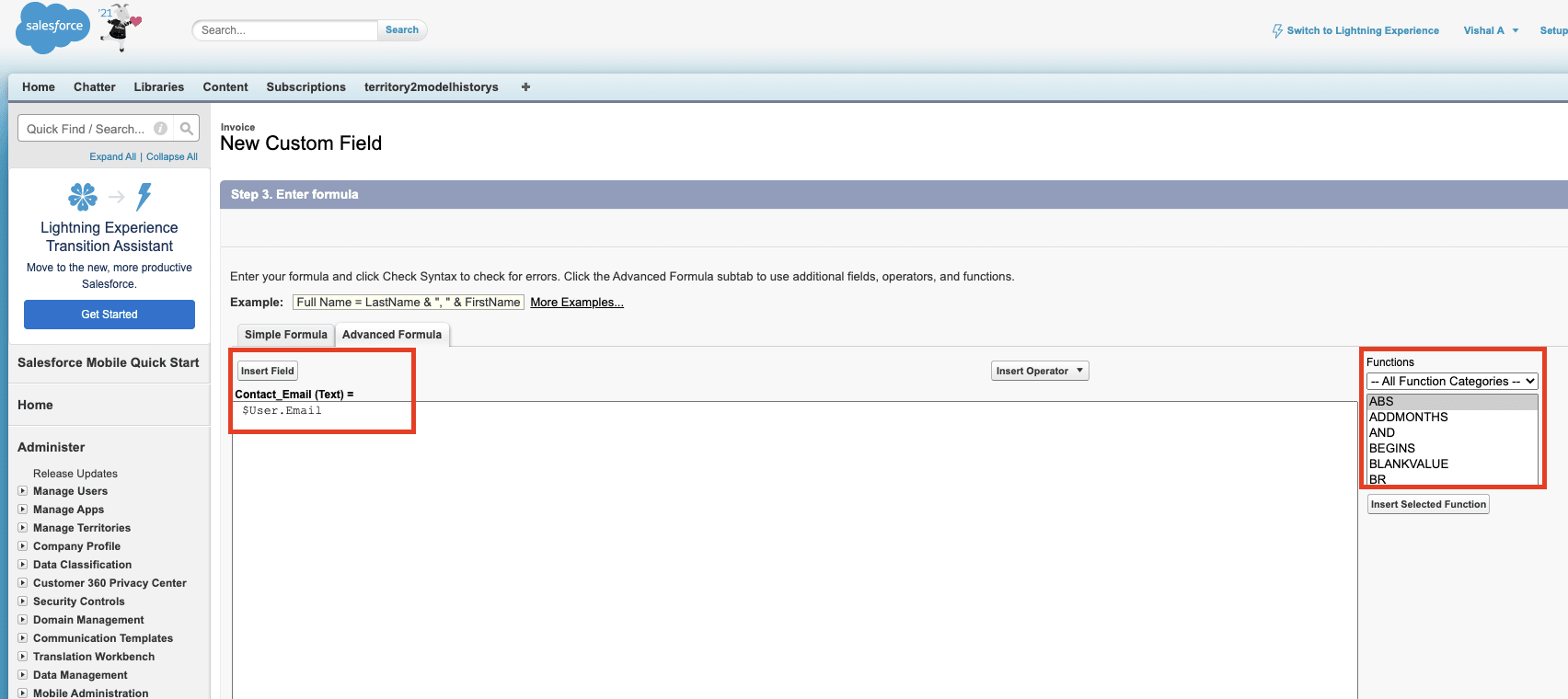
- Step 7: The Advanced Formula tab will look something like the below image. You can add multiple fields here along with the functions available on the page.
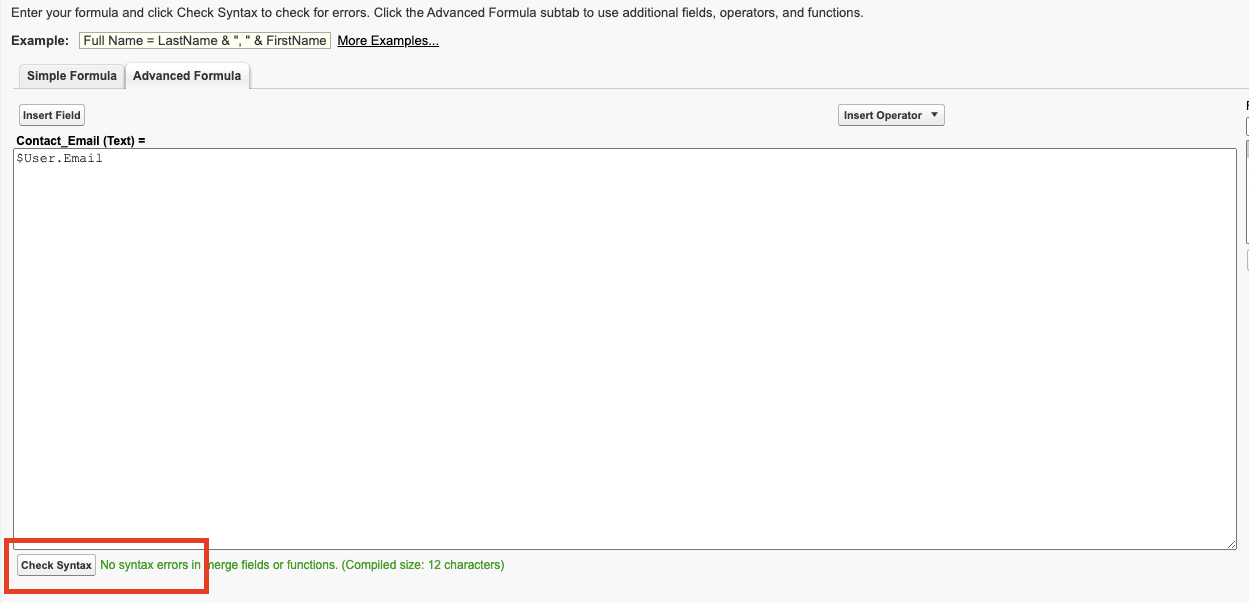
- Step 8: Click on Check Syntax to make sure there are no errors, and then click on Next, if there are no errors.
- Step 9: Ensure the Visible checkbox is checked so all profiles are selected, and click Next.
- Step 10: Click on Save. You can click on Save & New if you wish to create more fields.
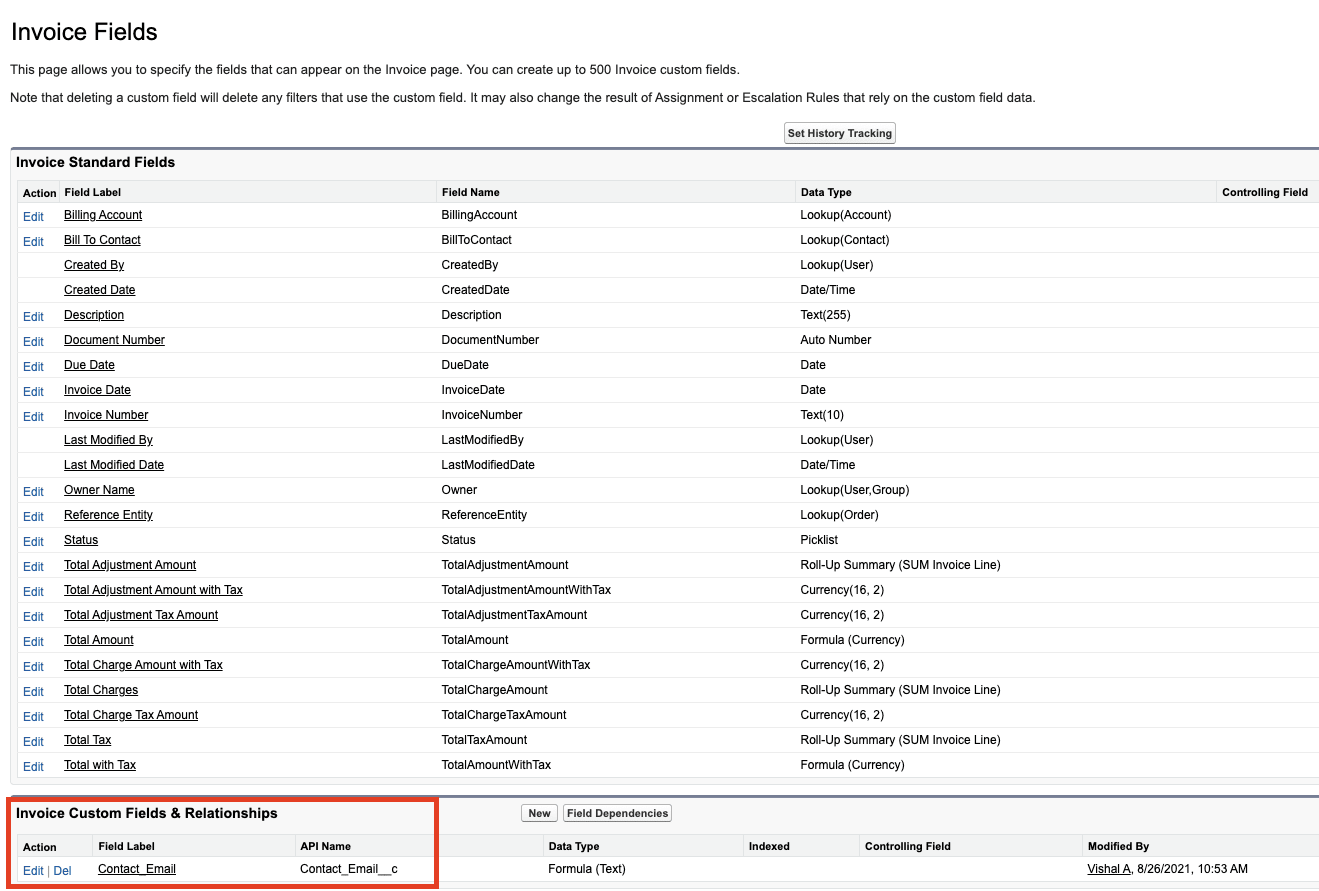
- Step 11: Once successful, the custom fields will be shown in Invoice Fields.
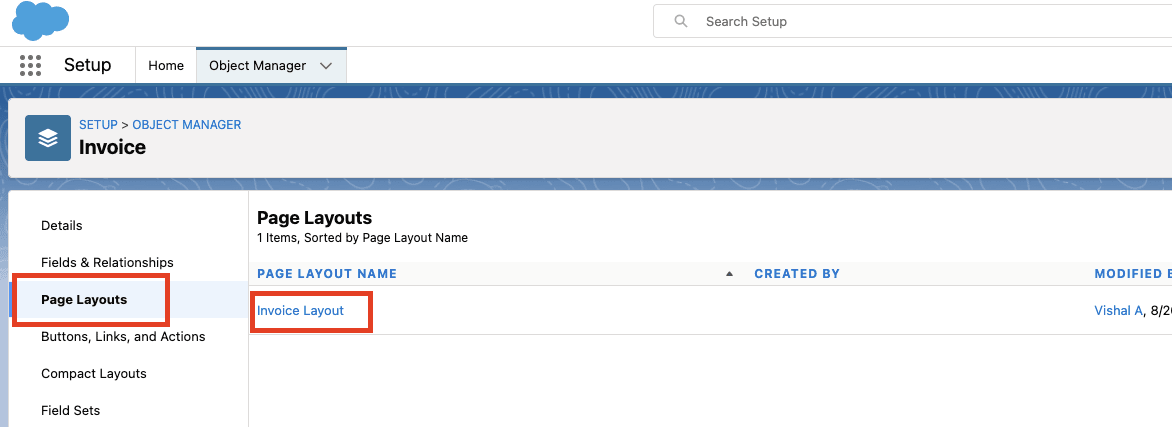
- Step 12: Once you have successfully created a custom field with Cross Object linked relationship, you can view it in the Page Layout. To do so, Navigate to Page Layout and click on Invoice Layout.
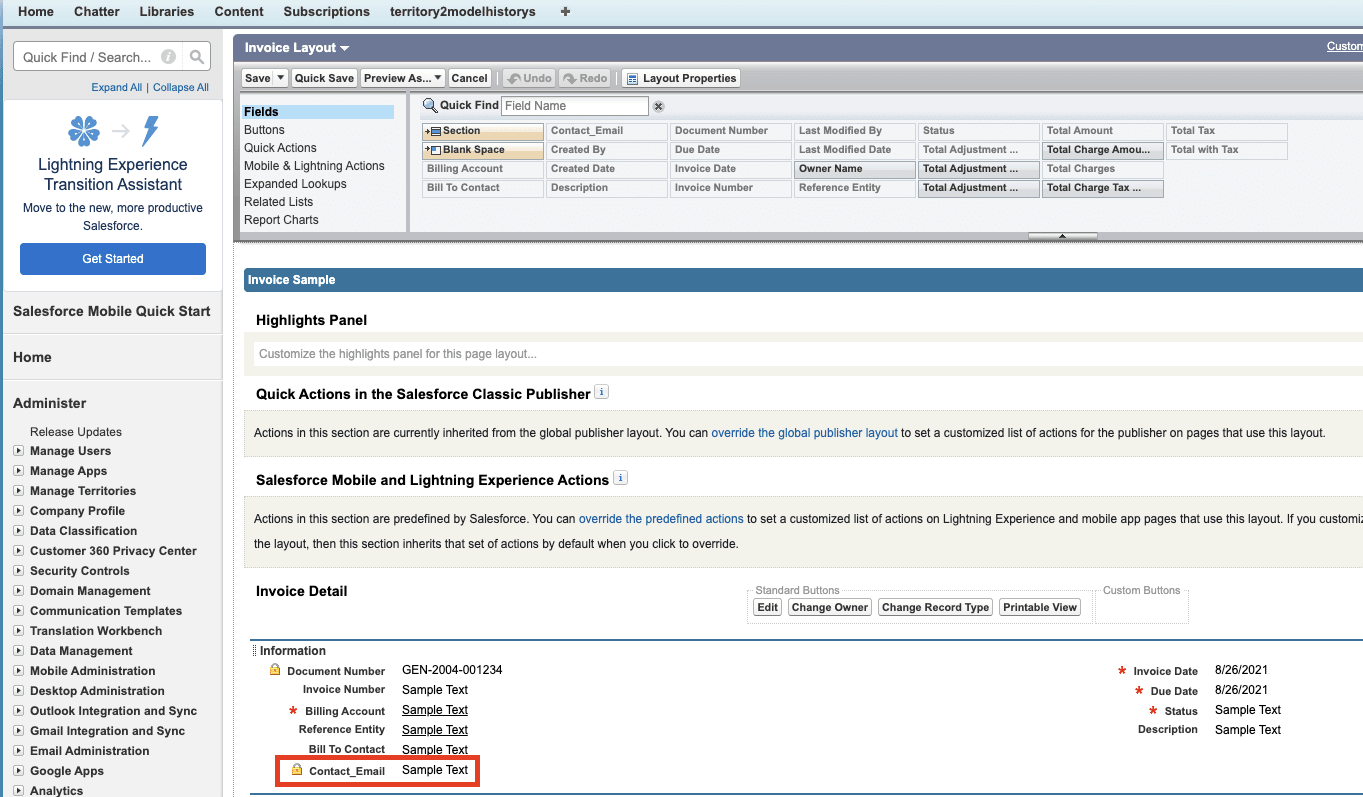
- Step 13: A new page will open and the new field will be reflected under Information Panel.
Limitations of Cross Object Formula Salesforce Fields
Some limitations that come along with using Cross Object Formula Salesforce Fields are as follows:
- The Formula Fields are read-only fields which means you cannot edit the values.
- The Formula Field derives the value from the formula expression. Hence you cannot change or alter the value. If you wish to change the value, you have to do so by editing the formula.
- The value of the Formula Field entirely depends on the source field and the formula. If there are any changes in the Source field, they will be reflected.
Conclusion
In this article, you learned about Salesforce and the salient features that it offers. You also learned about Cross Object Formula Salesforce field and the steps required to create a Cross Object Salesforce field. However, to carry out an in-depth analysis of your Campaigns, Customer, and Other Marketing Initiatives, you would often need to extract data from multiple sources to have all insights. Integrating your customer data from a diverse set of sources into your CRM application such as Salesforce can be challenging and this is where Hevo Activate comes into the picture.
Visit our Website to Explore Hevo
Hevo Activate will automate your data transfer process, allowing you to focus on other aspects of your business like analytics, customer management, etc. This platform allows you to transfer data from Cloud-based Data Warehouses like Snowflake, Google BigQuery, Amazon Redshift, etc to various CRMs like Salesforce and SaaS applications. It will provide you with a hassle-free experience and make your work life much easier.
Want to take Hevo for a spin? Sign Up for a 14-day free trial and experience the feature-rich Hevo suite first hand. You can also have a look at the unbeatable pricing that will help you choose the right plan for your business needs.
Share your experience of learning about Cross Object Formula Salesforce Field. Tell us in the comments below!
Empower Customer Analytics Using Hevo Activate
Continue Reading

Become a Contributor
You can contribute any number of in-depth posts on all things data.
Write for Hevo
How To Create Cross Object Formula Field In Salesforce
Source: https://hevodata.com/learn/cross-object-formula-salesforce/
Posted by: brittfrok2001.blogspot.com
0 Response to "How To Create Cross Object Formula Field In Salesforce"
Post a Comment